I want to share a few tips for anyone thinking of ordering a virtual tour. Normally I go through all of this in person, but it often helps clients to think ahead of time about what exactly they want to show in the 3D panoramas.
As an example of a virtual tour with music and narration, take a look at:
Video can be embedded in a panorama. There are two ways: 1 — video is triggered by clicking a button and opens in a separate player window (a YouTube video works fine here). In that case, the video only loads when someone clicks to play it. 2 — video can be embedded directly into the interior and plays automatically, but this makes the panorama slower to load, since the visitor has to download the video along with the panorama whether they want to or not. I recommend the first option — load video on demand. Forcing video to load can leave visitors with a slow connection seeing nothing, or waiting a very long time.
A photo gallery can be embedded in a panorama too. This is handy for a restaurant, for example — to show the menu right inside the panorama.
A modern panorama works across all operating systems — Apple, Windows, Android. Though this does depend on the software the photographer uses.
Shooting a territory panorama from an elevated point makes it easier to view and adds more information.
The question of how many panoramas to shoot for a single tour always comes up. The number and shooting locations depend on your goals — how thoroughly you want to show the venue. You can actually estimate the number yourself ahead of time.
Keep in mind that a 3D panorama shows everything, but only from one point. Panoramas are usually shot at eye level, so you can figure out in advance how many panoramas to order and from which points, to show the most useful information.
A simple way to check this yourself: stand in the spot and look around without moving — whatever you see is what will appear in the 3D panorama. If you can't see something from there, it won't be visible in the panorama either. Need to see more? Then either change the shooting point, or shoot two or more panorama points.
Take a restaurant tour as an example. Want to show the entrance, driveway and parking? You need a panorama shot at the entrance. Stand by the entrance and look around. If you can see the parking lot, flower beds, and approach to the restaurant — great, that point gives maximum information. Want to show off a beautifully designed lobby? Then shoot a panorama in the lobby too, not just the main dining room. Say the restaurant has one large dining room — you could shoot one panorama in the middle, or 2–3 points at different ends of the room so the client can examine the design in more detail.
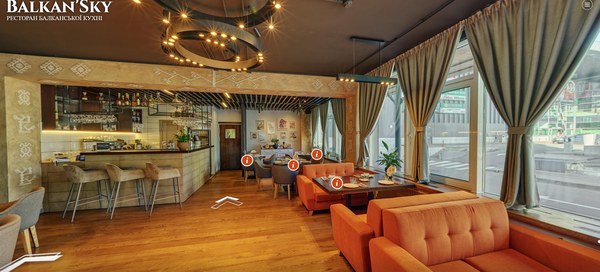
For a 3D panorama shoot, the space needs to be fully prepared and cleaned in advance. Shooting a virtual tour is different from regular photography, where you can capture some things and leave others "out of frame." If a panorama is shot indoors (real estate, a restaurant, a hotel, etc.), the entire room needs to be tidy: a bucket in the corner will be visible, a jacket hanging crookedly on a hook will be visible, freshly mopped floors will show as part-dry, part-wet. Open windows, doors, a bag left in the corner — all of it will be visible.
If a panorama is shot outdoors, weather matters in addition to the shooting point. If you'd like, you can shoot different tours for winter, summer, and autumn, then swap tours on the site by season or display all of them at once. This is especially relevant for resorts and vacation venues, where clients want to see the location across different seasons.
It's very useful to shoot a territory from an elevated stand — 3–4 meters up. That way a single panorama covers much more ground. It gives a slightly "elevated" viewpoint, and the panorama ends up far more informative for the viewer.
I'm happy to help you figure out which tour format will best represent your venue.